API pricing · Reporting
Gemini Omni 1.2 Flash: what a 15-second API video actually costs
The $0.07-per-second headline is a 720p video-output estimate, not a complete project quote. Check resolution, input charges and reference limits first.
The launch price is a starting point
Google launched Gemini Omni 1.2 Flash on November 5 with native clips up to 15 seconds and a headline 720p price of roughly $0.07 per second. For a creator budgeting a short product video, that makes a single generation look inexpensive. But multiplying the rounded headline by the requested duration is not the same as estimating a finished asset.
The release also adds conversational editing and stronger reference following. Those are provider-described capabilities, not a promise that your first attempt will pass review. Before comparing this API with a subscription or another video model, specify the delivery resolution, required references and number of usable clips. Otherwise the cheaper-looking option may be pricing a different task.
Read the token conversion behind the seconds
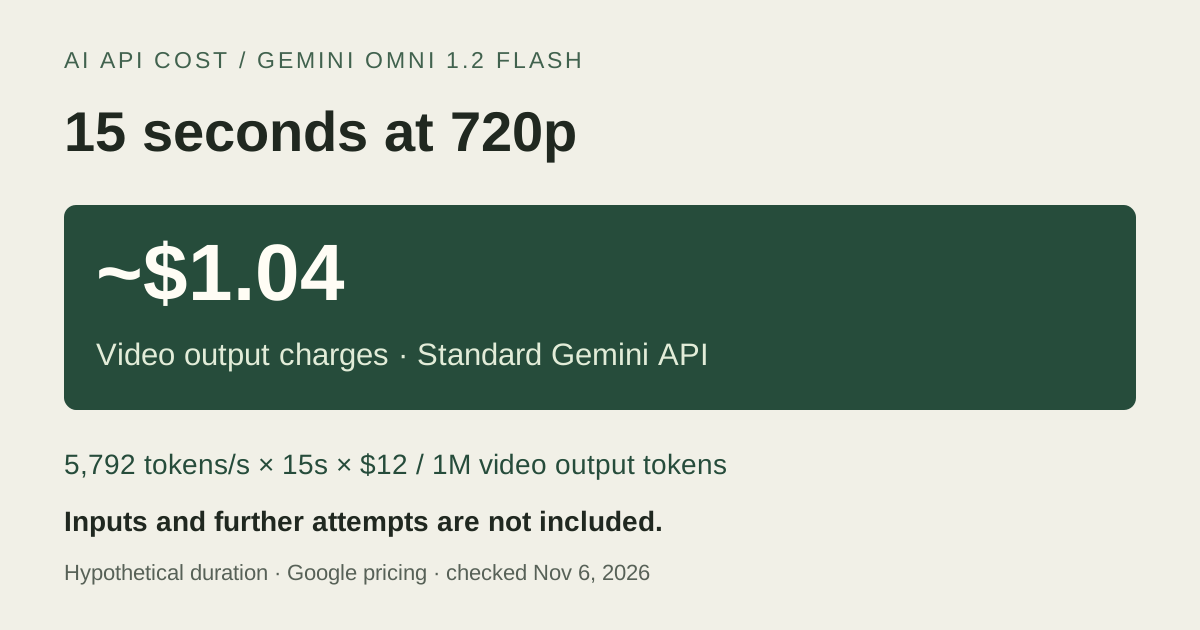
Google's Standard Gemini API table bills video output at $12 per million tokens and specifies 5,792 video tokens per second at 720p. A hypothetical 15-second output therefore costs $1.04256, or about $1.04, for video output alone. The same table separately charges inputs and text output; the model is not available on the Free tier.
Resolution changes the conversion, as the table shows. Do not apply the 720p estimate to a 4K delivery. The developer guide labels 1080p and 4K as upscaled outputs, so record that distinction alongside the quoted resolution rather than describing them as native higher-resolution generation.
Same 15-second duration, different output charge
Scroll sideways to read all columns.
| Resolution | Video tokens/s | Video output only |
|---|---|---|
| 360p | 1,931 | $0.35 |
| 720p | 5,792 | $1.04 |
| 1080p, upsampled | 8,688 | $1.56 |
| 4K, upsampled | 17,376 | $3.13 |
Fifteen seconds does not apply to every reference workflow
The Gemini API guide limits first-and-last-frame interpolation to 3–10 seconds; requesting more than 10 seconds with two endpoint images returns an invalid-argument error. The Cloud model reference also lists that shorter limit. A 15-second brief using endpoint images is therefore not interchangeable with a supported 15-second generation workflow.
Native audio output is another distinction worth checking. The Gemini API guide says uploading audio inputs or references and voice editing are unsupported in the current API. Do not infer that a narrated launch demonstration means you can upload a voice sample on your account. If a particular reference mode is essential, verify that mode on the exact API surface before including it in the budget.
Budget an accepted clip, not just a generated one
For an approved test, keep the product references, brief and pass criteria fixed. Record actual duration, resolution, returned usage, elapsed time and each paid generation or edit. Check the product's shape, readable packaging and continuity across the complete clip, not only the opening frame. None of the calculations here comes from a model run.
Use the output table as a bounded estimate, then add the applicable input and text-output charges from recorded usage. Keep rejected clips in the account. Conversational editing may be useful, but it should not be treated as free correction work. Compare total spend divided by accepted clips only once you have accepted results; if none pass, record the failed experiment and its spend instead.
Sources & verification
Provider documentation supports the facts referenced below. Our explanations and recommendations are editorial interpretation.
- Google: Introducing Gemini Omni 1.2 Flash ↗Checked Nov 6, 2026
- Google: Gemini Developer API pricing ↗Checked Nov 6, 2026
- Google: Generate and edit videos with Gemini Omni Flash ↗Checked Nov 6, 2026
- Google Cloud: Gemini Omni 1.2 Flash model reference ↗Checked Nov 6, 2026
Corrections: hello@aiapicost.com